How to Rank #1 on Google Maps: The Complete 2026 Guide
When someone in your city searches for the service you provide, does your business appear in the top three Google Maps results?
If the answer is no — or if you're not certain — you're losing customers to competitors right now, every single day. The Google Local Pack (the map block with three business listings at the top of search results) captures more than half of all clicks on local search pages. The #1 position in that pack is the most valuable piece of digital real estate any local business can own.
Here's what most business owners don't realise: Google Maps rankings are not based on luck, tenure, or advertising spend. They're based on a clear set of measurable signals — signals you can optimise, strengthen, and dominate. This guide covers every one of them.
How Google Decides Who Ranks on Google Maps
Google evaluates local businesses using three primary ranking factors. Everything else in this guide either feeds into or directly improves one of these three:
1. Relevance
How well does your Google Business Profile and website match the searcher's specific query? When someone searches "emergency dentist downtown Chicago," relevance determines whether your dental practice is considered a match for that exact search.
2. Distance
How close is your business to the searcher's location or to the location mentioned in the query? Distance matters — but it does not override everything. A business 3 miles away with an exceptional, fully optimised profile consistently outranks a business 0.5 miles away with a thin, incomplete one.
3. Prominence
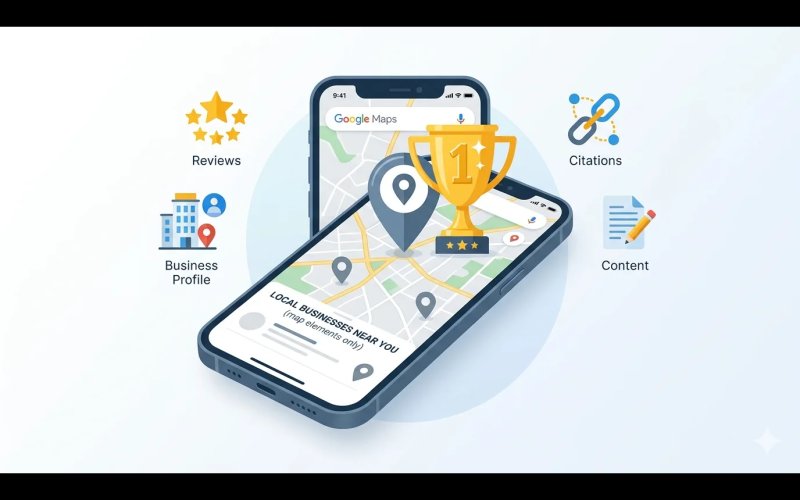
How well-known and trusted is your business across the web? Google measures prominence through your review volume and rating, the authority of websites that link to or mention you, how consistently your business data appears across online directories, and how actively managed your GBP profile is.
Every step in this guide directly improves one or more of these three signals.
Step 1: Claim and Fully Verify Your Google Business Profile
You cannot rank on Google Maps without a verified GBP. If you haven't claimed yours, go to business.google.com and complete the verification process. If you're unsure whether your profile has been claimed, search your business name on Google Maps — if you see "Claim this business," it hasn't been claimed.
Once verified, your GBP becomes your primary local SEO asset. According to Google's own research, businesses with complete, verified profiles are significantly more likely to receive direction requests, calls, and website visits than businesses without one.
For a complete audit of your current GBP's health, use our Free GBP Audit Tool — it checks 40+ ranking factors in under 5 minutes.
Step 2: Select the Right Primary Category — Your Single Most Important Decision
Your primary category tells Google which search queries your business should appear for. Choose it incorrectly and you're invisible for your most profitable keywords — regardless of how good everything else is.
How to choose correctly:
Search your primary service plus your city on Google Maps. Examine the top 3 ranked businesses. What primary category does each one use? Choose the most specific, accurate category that reflects your core business. Then add secondary categories for every additional service you offer.
Example: A business that does both plumbing and HVAC should use "Plumber" or "HVAC Contractor" as its primary (whichever drives more revenue) and add the other as a secondary category.
Step 3: Complete Every Field on Your Profile — No Exceptions
Following Google's March 2026 core update, profile completeness became a direct ranking signal. Profiles with missing fields are now actively penalised relative to complete competitors — not just missing out on a bonus, but ranked lower as a direct result.
Work through every section of your profile:
Business Name
Your exact legal business name only. No keywords, no location descriptors, no taglines. Just the name your customers know you by.
Business Description
Use all 750 characters. Open with your primary keyword naturally, explain your services and differentiators, mention your location and service area, and end with a call to action. This field is indexed by Google.
Services
List every service you offer with individual descriptions and prices. Each service entry is a separate keyword opportunity.
Attributes
Check every applicable attribute — accessibility features, payment methods accepted, amenities, certifications. These appear in your search listing and help Google understand your business in detail.
Hours
Complete all standard hours. Update special hours for every public holiday. Outdated or missing hours are a signal of neglect.
Photos
Upload a minimum of 10 photos — your exterior, interior, team, work examples, and products or services. Listings with photos consistently receive more engagement than those without.
Q&A
Write and answer your own questions. Examples: "What areas do you serve?" "Do you offer free estimates?" "What are your payment options?" These appear in your listing and address buyer objections before customers even visit your website.
GBP Posts
Publish at least one post per week. Posts expire after 7 days, so weekly publishing is the minimum to maintain an active signal.
Not sure what you're missing? Run the free GBP audit for a complete completeness report.
Step 4: Build a Systematic Review Generation Strategy
Reviews are the second most powerful Google Maps ranking factor and the most powerful customer trust signal. In 2026, three specific review metrics drive your ranking:
Recency
A business with 15 reviews from this month outranks one with 200 reviews from 2022. Google weights recent reviews far more heavily than old ones — because recency proves your business is currently active.
Response Rate
Businesses that respond to 100% of their reviews rank higher than those that respond to none. Every response is a Google-indexed piece of keyword-rich content on your listing.
Volume vs. Local Competitors
You don't need 1,000 reviews — you need more recent reviews than whoever is ranked above you.
How to generate reviews systematically:
After every completed service or transaction, send a follow-up text or email with a direct link to your Google review page. Make it one tap for the customer. Never offer incentives — this violates Google's policy and risks suspension. Respond to every review, positive or negative, within 24 hours.
Our Review Generation service at SBGeeks delivers a 92% success rate and 3–5x review velocity improvement within 30 days.
Step 5: Post on Your GBP Every Single Week
Most businesses claim their GBP and never return to it. This creates an enormous opportunity for you — because consistent GBP activity is a direct signal that Google uses to assess whether a business is actively serving customers.
What to post weekly:
- Service spotlights and seasonal offers
- Customer success stories (with permission)
- Behind-the-scenes team or workplace photos
- Industry tips relevant to your customers
- Announcements — new services, awards, changed hours
- Educational content your target customers would find useful
Each post should include your primary keyword naturally and a clear call to action. Publish a minimum of one post every 7 days to maintain an active signal.
Step 6: Build Your Citation Foundation
Citations are online mentions of your business's Name, Address, and Phone number (NAP) across directories, review sites, and online platforms. They directly influence your Prominence score with Google.
The cardinal rule: Your NAP must be character-for-character identical across every platform. Not approximately the same — exactly the same. A missing period, an abbreviated "St" instead of "Street," or a different phone format creates conflicting signals that suppress your local rankings.
Priority citation sources to cover:
- Yelp
- Bing Places
- Apple Maps
- Facebook Business Page
- BBB (Better Business Bureau)
- Foursquare
- Chamber of Commerce website
- Industry-specific directories relevant to your niche
Our Citation Building service builds consistent listings across 50+ high-authority directories as part of every SBGeeks management plan.
Step 7: Optimise Your Website for Local Search Signals
Your website and your GBP work together. Google uses your website as a supporting trust signal when determining local pack rankings.
Title Tags with Location
Every page targeting local customers should include your keyword and city. Format: "Primary Service in City, State | Business Name."
LocalBusiness Schema
Add JSON-LD LocalBusiness schema markup to your website. This provides Google with machine-readable confirmation of your business name, address, phone, hours, and services — directly supporting your GBP data.
NAP in Footer
Your complete business name, address, and phone number should appear in the footer of every page on your website, formatted identically to your GBP.
Dedicated Service Pages
Each core service should have its own dedicated page, not just a section on your homepage. Individual service pages rank independently and strengthen your overall local authority.
Page Speed
Mobile load time became a direct local ranking factor in the March 2026 update. Your site should load in under 2.5 seconds on mobile. Test it at Google PageSpeed Insights.
Step 8: Earn Local Backlinks
Backlinks from locally relevant, authoritative websites directly boost your Prominence score. This is one of the strongest local ranking signals you can build.
How to earn local backlinks:
- Get listed in your local Chamber of Commerce directory
- Sponsor local events and request a link on the event website
- Partner with complementary local businesses for mutual referrals and website mentions
- Submit your business to industry associations and professional bodies
- Seek coverage in local news media or community blogs
- Write guest articles for local industry publications
Even unlinked mentions of your business name and location on authoritative sites contribute to your Prominence signal.
Step 9: Monitor, Measure, and Improve Monthly
Ranking #1 on Google Maps is not a one-time achievement — it requires ongoing management. Competitors optimise constantly, Google updates its algorithm, and rankings shift. Monthly monitoring is essential to protect and improve your position.
Track monthly:
- Local keyword rankings — use BrightLocal, Whitespark, or Google Search Console
- GBP impressions, clicks, calls, and direction requests (available in your GBP dashboard)
- Review count and average rating vs. top 3 competitors
- New citations built vs. inconsistencies found
- Website traffic from local search queries
Let SBGeeks Do This For You
Every step in this guide is something our team executes professionally for 500+ local businesses. Our clients see an average:
- 47% increase in local search visibility
- 3.2x increase in monthly calls from Google Maps
- 200+ profiles currently ranked #1 in their local markets
Start with a free audit of your current Google Business Profile:
Or explore our full management plans — from $449/month with no long-term contracts.
Read real client results at sbgeeks.com/results.
Frequently Asked Questions
How do I rank #1 on Google Maps?
To rank #1 on Google Maps, verify and fully complete your Google Business Profile, select the correct primary category, generate consistent recent reviews, publish weekly GBP posts, build consistent NAP citations across directories, optimise your website with LocalBusiness schema and location-based title tags, and earn local backlinks.
What are the Google Maps ranking factors in 2026?
Google uses three primary ranking factors: Relevance (how well your profile matches the search query), Distance (proximity to the searcher), and Prominence (how well-known and trusted your business is across the web, measured through reviews, backlinks, citations, and profile activity).
How important are reviews for Google Maps ranking?
Reviews are the second most powerful Google Maps ranking factor. In 2026, review recency, response rate, and volume relative to local competitors are the three key metrics. A business with 15 recent reviews consistently outranks one with 200 old reviews.
How often should I post on my Google Business Profile?
Post at least once every 7 days. GBP posts expire after 7 days, so weekly publishing is the minimum required to maintain an active activity signal that Google uses when evaluating whether your business is currently serving customers.
What is NAP consistency and why does it matter for local SEO?
NAP stands for Name, Address, and Phone number. NAP consistency means your business details are character-for-character identical across every online directory, your website, and your GBP. Inconsistencies — even minor ones like "St." vs "Street" — send conflicting signals to Google and suppress your local rankings.
Does my website affect my Google Maps ranking?
Yes. Google uses your website as a supporting trust signal for local pack rankings. Key factors include location-based title tags, LocalBusiness schema markup, NAP in the footer matching your GBP exactly, dedicated service pages, and a mobile load time under 2.5 seconds.